HIPAA-oriented architecture
The product is designed for healthcare operations data. We do not use “HIPAA Certified.”
HIPAA-oriented architecture and BAA-ready infrastructure. This page walks the invite, role, and review process you see in the product — not a certification stamp.
We do not claim HIPAA Certified, SOC 2, GDPR, or HITRUST on this site.
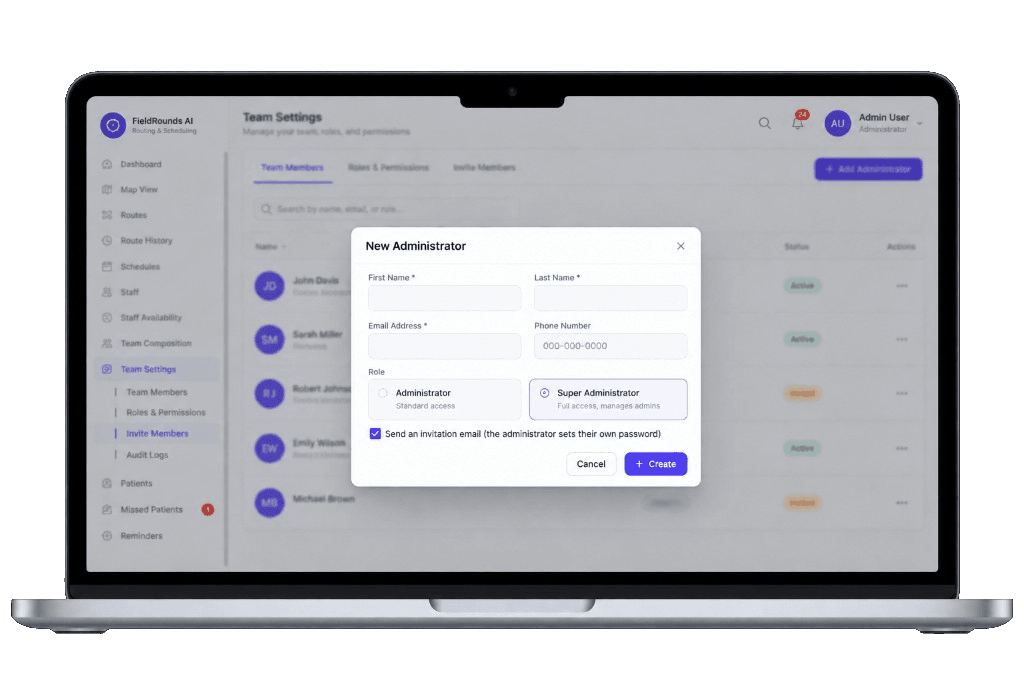
Public language first, then the invite screen, roles, separate apps, and what happens before any patient data moves.
The product is designed for healthcare operations data. We do not use “HIPAA Certified.”
A Business Associate Agreement is discussed before patient data is processed in the apps.
Office, field team, and household surfaces are not one shared inbox.
Who changed the board is part of the operations product, not a slogan.
The New Administrator dialog collects name, work email, and a role. An invitation email is sent so the person sets their own password. Names in this preview are sample UI, not real records.

The same path as the screen above — office staff stays on the admin host.
Invite Members is where the current admin starts. Roles & Permissions and Audit Logs sit next to it.
Administrator is standard access. Super Administrator can manage other admins.
The product sends an invitation email. The new person sets their own password.
Status shows Invited until they accept, then Active. Actions stay with an admin.
These are product roles in Team Settings. They are not compliance certifications.
Standard access to run the day’s board: visits, teams, and routes on the admin host.
Full access, including managing other administrators. Selected on the invite when that is the intent.
Providers work from the mobile app host — not the same login as the office board.
Patients can book and see an ETA on a separate patient host. That is not an admin seat.
Office command center: schedule, map, team settings, and invites.
Provider app for the people who actually run the stops.
Household booking and ETA. Not a shared inbox with the office.
Marketing and demo intake only. Organization and workflow — no PHI.
Walk Team Settings and the invite dialog with sample UI — not a live patient list.
We answer from architecture and contracting language. We will not invent badges to fill a cell.
A Business Associate Agreement is part of the conversation before patient data moves.
Access is provisioned on the product hosts. This website still does not collect PHI.
| Capability | FieldRounds | We will not say |
|---|---|---|
| Architecture | HIPAA-oriented | HIPAA Certified |
| Contracting | BAA-ready infrastructure | SOC 2 or GDPR badge |
| Access | Role-based invites and separate apps | One shared inbox for office and field |
| History | Audit trail in the product | HITRUST or invented attestations |
Team Settings includes Audit Logs next to Roles & Permissions. We describe the operations record — not a certified logging product.
A new administrator appears as Invited, then Active. The invite is an email they complete themselves.
Moving someone between Administrator and Super Administrator is an admin action, not a chat-thread edit.
Visit and team changes sit on the same operations record buyers ask to see on a demo.
An audit trail is not a substitute for a BAA, and it is not a certification we print as a badge.
We fill it from public language plus a product walk — we do not invent missing badges.
Ask to see Invite Members, the two admin roles, and the invitation-email path.
Admin, med-team, and patient hosts stay separate from this marketing site.
Before patient data is processed in the apps — not before a first demo.
We do not claim HIPAA Certified, SOC 2, or GDPR badges. We describe HIPAA-oriented architecture and BAA-ready infrastructure.
A Business Associate Agreement is part of the contracting conversation before patient data moves. This marketing site does not collect PHI.
An existing admin opens Team Settings, chooses a role, and sends an invitation email. The new administrator sets their own password.
The product UI distinguishes Administrator (standard access) and Super Administrator (manages other admins). Field and household users sit on separate apps.
Who changed the board, who invited a user, and who changed a role is part of the operations product — including an Audit Logs area in Team Settings. That is not a certification badge.
On separate hosts (admin, med-team, patient). Those apps should remain noindex.
No. Use organization and workflow details only.
No. It is public copy. Detailed questionnaires happen after a demo.
Tell us about the field team. Do not include patient names or other protected health information in this form.
Bring your questionnaire. We will not invent badges to fill gaps.